

Remove /apps/ecomposer-visual-page-builder from Google search results
In some cases, the URL /apps/ecomposer-visual-page-builder may appear in Google search results. This URL is an internal path used by EComposer and is not intended to be indexed by search engines.
You can remove this URL from Google search results and prevent it from being indexed again by following the guides below.
1. Request Google to remove the URL
Step 1: Open Google Search Console.
Step 2: Select your website property.
Step 3: Click Removals in the left sidebar.
Step 4: Click New request.
Step 5: Enter the URL: https://yourstore.com/apps/ecomposer-visual-page-builder
Step 6: Select Remove this URL only.
Step 7: Click Next and submit the request.
Google will temporarily remove the URL from search results while it re-crawls your website.
2. Prevent the URL from being indexed again
To prevent search engines from indexing this path again, you can block it using the robots.txt file.
2.1. If your store already has a robots.txt.liquid file
Step 1: In your Shopify admin, go to Online Store → Themes.
Step 2: Click Edit code.
Step 3: Open the file robots.txt.liquid.
Step 4: Add the following line below and click Save
Disallow: /apps/ecomposer-visual-page-builder
2.2. If your store does not have a robots.txt.liquid file
You can create one manually.
Step 1: Go to Online Store → Themes.
Step 2: Click Edit code.
Step 3: Click Add a new template.
Step 4: Choose robots as the template type.
Step 5: Select robots.txt.liquid.
Step 6: Add the following code below and click Save.
<!-- Liquid for default rules -->
User-agent: discobot Disallow: /apps/ecomposer-visual-page-builder
Please follow the image below:
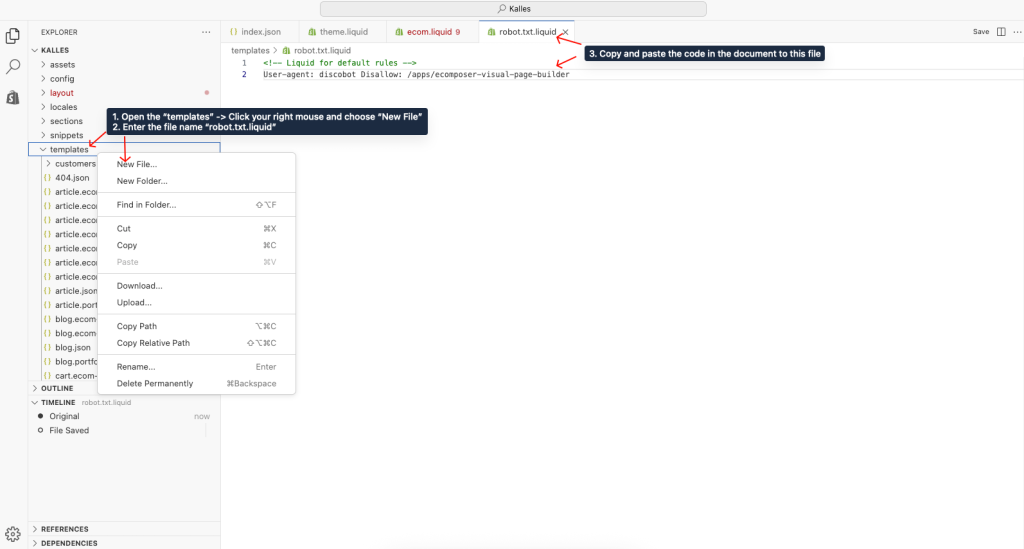
This rule tells search engines not to crawl or index this path.
Notes
- It may take several days for Google to update the search results.
- This URL is only used internally by the app and does not affect your storefront.
- Blocking the URL in
robots.txthelps prevent it from appearing in search results again.