

Judge.me Extensions
Judge.me Review App helps you collect and display customer reviews, ratings, photos, and videos to build trust and increase sales. By installing the Judge.me Extensions in the EComposer app, you can easily drag and drop the extensions into the page editor and place them wherever you prefer on your EComposer page. This integration leverages social proof to build customer trust, strengthen product credibility, and drive conversions.
The following Judge.me extensions are available in EComposer:
- Judge.me – Testimonials Carousel: Displays customer testimonials in a carousel format (Slider) to build trust and highlight positive experiences.
- Judge.me – Review Widget: Displays detailed product reviews, ratings, photos, and videos.
- Judge.me – Star Rating: Displays the average star rating and review count for products.
- Judge.me Happy Customers: Showcases positive customer reviews, ratings, photos, and videos.
- Judge.me Videos Carousel: Displays customer video reviews in a visual carousel.
- Judge.me Reviews Grid: Displays multiple customer reviews in a structured grid layout.
- Judge.me Review Snippets: Highlights selected review excerpts as quick social proof.
- Judge.me Reviews Carousel – Legacy: Displays customer reviews in a traditional carousel layout.
- Judge.me Verified Reviews Badge: Highlights verified reviews to increase customer trust and credibility.
- Judge.me Instagram Shopping Grid: Displays Instagram content and user-generated content in a shoppable grid.
- Judge.me Trust Badge: Displays trust signals to reassure customers and support purchasing decisions.
- Judge.me Section For Medals: Displays Judge.me medals as trust and credibility indicators.
- Judge.me Cards Carousel: Displays customer reviews in a card-style carousel with ratings, text, photos, or videos.
To use this extension, please install the Judge.me app from your Shopify store first.

1. How to install Judge.me extensions in EComposer?
Step 1: From your EComposer dashboard, go to CRO Extensions from the left sidebar menu.
Step 2: Search for the Judge.me extension that you need.
Step 3: Click Details and install the extension on your store.
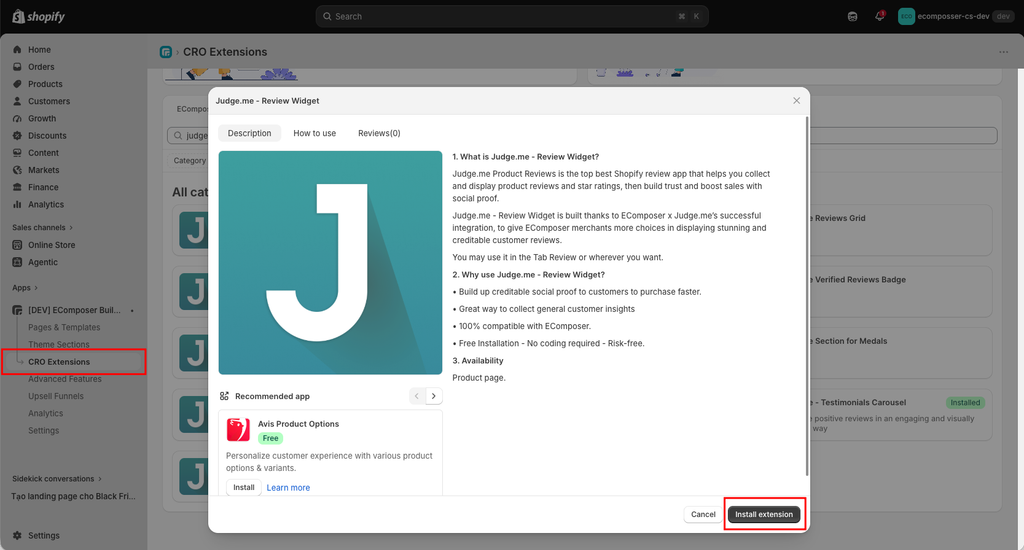
Note: This installation process will be the same for all extensions.
2. Call the Extension to the Editor & Customize
Inside the EComposer editor, open the Extensions tab from the left sidebar, then find the Judge.me extension from the installed extensions list and drag it into your desired position on the page. After adding it successfully, you can start customizing the extension settings and style.
Notice: This feature only work on the live page